How to Update a Cronjob E-mail Address?

If you want to receive a cronjob error or notification, you can update your e-mail address from the cPanel's Cronjob Page.

1. Log into your cPanel account.
2. In the "Advanced" section, click on "Cron Jobs" Icon.
 

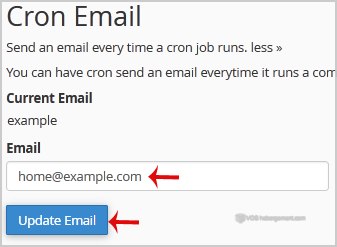
3. Under "Cron Email" you should enter your full e-mail address in text field.

4. Click on the "Update Email" Button.

Was this answer helpful?

 Print this Article

Also Read

How to check disk usage of directory and bandwidth usage?

If you are receiving a disk space usage warning and don't know which folder is using too much...

How to Edit .htaccess File via the cPanel Filemanager?

1. Log into your cPanel account.2. In the "Files" section, click on "File Manger" Icon. 3. cPanel...

How to Change cPanel Style/Theme?

Switching over to another cPanel theme with a different style is easy and there are two ways to...

How to edit or remove CNAME Record in cPanel using the DNS Zone Editor?

You can edit or remove CNAME Record from cPanel using the cPanel DNS Zone Editor which allows you...

How to edit or remove MX Record in cPanel using the DNS Zone Editor?

You can edit or remove MX Record from cPanel using the cPanel DNS Zone Editor which allows you to...