How to Edit or Delete Cronjob via cPanel?

How to Edit Cronjob?
1. Log into your cPanel account.

2. In the "Advanced" section, click on "Cron Jobs" Icon.
 

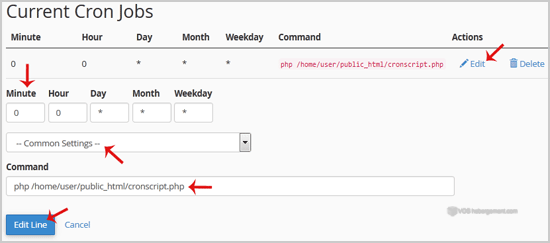
3. Scroll down to the end of page and under "Current Cron Jobs", locate your cronjob and then click on the "Edit" button.

4. Make appropriate changes and then click on the "Edit Line" button.


How to Delete Cronjob?
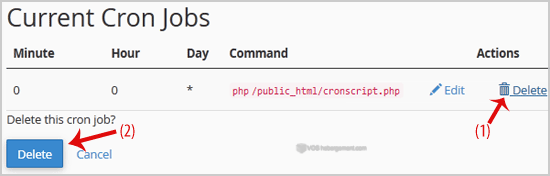
1. Under "Current Cron Jobs", locate your cronjob and then click on "Delete" button
2. Under "Delete this cron job?" text, click the "Delete" Button.

Was this answer helpful?

 Print this Article

Also Read

How to Edit .htaccess File via the cPanel Filemanager?

1. Log into your cPanel account.2. In the "Files" section, click on "File Manger" Icon. 3. cPanel...

How to add a MX Record in cPanel using DNS Zone Editor?

A mail exchanger record (MX record) is a type of resource record in the Domain Name System that...

How to add A Record in cPanel using DNS Zone Editor?

A Record is a DNS record and is used to point a domain or subdomain to an IP address. You can add...

How to update your cPanel Contact Information or receive a notification on reaching quota limit?

If you want to receive notification on reaching your disk quota, bandwidth usage limit, reaching...

How to Reset my cPanel Account Password?

If you can access your cPanel account, follow these steps to reset your password:1. Log into your...