How to create Cronjob via cPanel?

1. Log into your cPanel account.
2. In the "Advanced" section, click on "Cron Jobs" Icon.
 

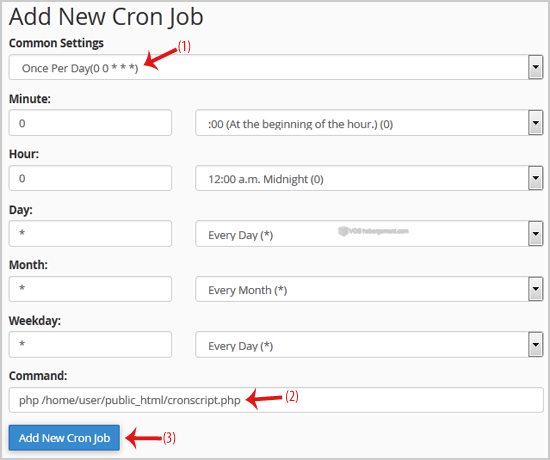
3. Under "Add New Cron Job", click on the "Common Settings" dropdown menu and select an appropriate option such as "Once Per Day" or another suitable option.

4. Enter your cronjob php file location or the command you want to run in the Command field.

5. Click on the "Add New Cron Job" button. 

Was this answer helpful?

 Print this Article

Also Read

How to Update a Cronjob E-mail Address?

If you want to receive a cronjob error or notification, you can update your e-mail address from...

How to add a MX Record in cPanel using DNS Zone Editor?

A mail exchanger record (MX record) is a type of resource record in the Domain Name System that...

How to create a new folder or files in the cPanel File Manager?

1. Log into your cPanel account.2. In the "Files" section, click on the "File Manger" Icon. 3....

How to Edit or Delete Cronjob via cPanel?

How to Edit Cronjob?1. Log into your cPanel account.2. In the "Advanced" section, click on "Cron...

How to upload files using FileManager?

If you don't want to use a 3rd party FTP Software, you can use the cPanel's inbuilt File...